Ronix Hub Script Roblox 2026 is a highly effective all-in-one script hub that is meant for players who are looking for a one-stop solution that can be used on multiple Roblox games. Rather than using different scripts for different games, Ronix Hub enables you to use a single script that will automatically provide access to game-specific features.
Ronix Hub Script Roblox 2026 is updated for 2026 and is designed to provide seamless functionality, an intuitive interface, and regular updates that will cater to the needs of the latest Roblox games. Whether you are into PvP battleground games, anime games, simulators, or role-playing games, Ronix Hub provides an all-in-one scripting experience.
What Is Ronix Hub Script?
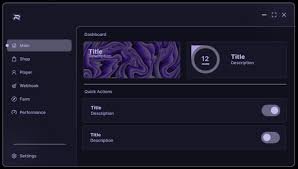
Ronix Hub is a Lua-based universal Roblox script hub that runs through supported executors. Once executed, it opens a graphical user interface (GUI) where features are automatically adjusted based on the game you are playing.
Instead of manually configuring scripts, Ronix Hub detects supported games and loads optimized tools such as automation, combat assistance, ESP, teleport options, and quality-of-life improvements.
This makes Ronix Hub ideal for:
- Players who switch between games frequently
- Beginners who want simple toggles
- Advanced users looking for a stable universal hub
Ronix Hub Script Roblox – Universal Script Code
Use the script below to load Ronix Hub in supported Roblox executors:
loadstring(game:HttpGet("https://api.luarmor.net/files/v3/loaders/fda9babd071d6b536a745774b6bc681c.lua"))()Ronix Hub Key System – How It Works
Ronix Hub uses a key-based system powered by Luarmor. This system helps reduce abuse, maintain script stability, and ensure frequent updates for active users.
Official Ronix Hub Key Link:
https://ads.luarmor.net/get_key?for=Ronix_Hub_Key_Ststem-FIDnQWNJRPDQ
You only need to complete the key process once per session.
How to Get Ronix Hub Key (Step-by-Step)
- Execute the Ronix Hub script in Roblox
- Click the Get Key button in the GUI
- You will be redirected to the official Luarmor page
- Complete the required steps
- Copy the generated key
- Paste the key into Ronix Hub
- Submit to unlock full access
How to Use Ronix Hub Script in The Roblox?
Follow the step-by-step guide below to use Ronix Hub Script using the Roblox executor:
- Step 1. First, download the latest version of the Krnl or Delta executor on your device (PC, Android, iOS).
- Step 2. Install the Roblox executor on your desired device.
- Step 3. Launch Roblox and start playing the Rivals game.
- Step 4. Wait a second till the UI appears, then copy the desired script from our list above.
- Step 5. Open the Executor control panel while playing Roblox. Paste the copied script into the appropriate field.
- Step 6. Click the “Execute” button to run the script.
- If you did everything correctly, a script GUI will appear in Rivals.
You can also use other executors to run scripts in Roblox, but Delta is the best because it’s available for Android and iOS devices. Windows players can use Xeno Executor.