
Would you like to have an easy way to win at Survive LAVA for Brainrots in Roblox? This no-key script, which gives the player useful attributes such as lava protection, teleporting to any area, money gathering, and also gathering brainrots, may turn out to be very helpful to players who want to progress levels without having to go through the grind.
Here are some working scripts that will help you survive for longer, move faster, as well as get more rewards with less stress.
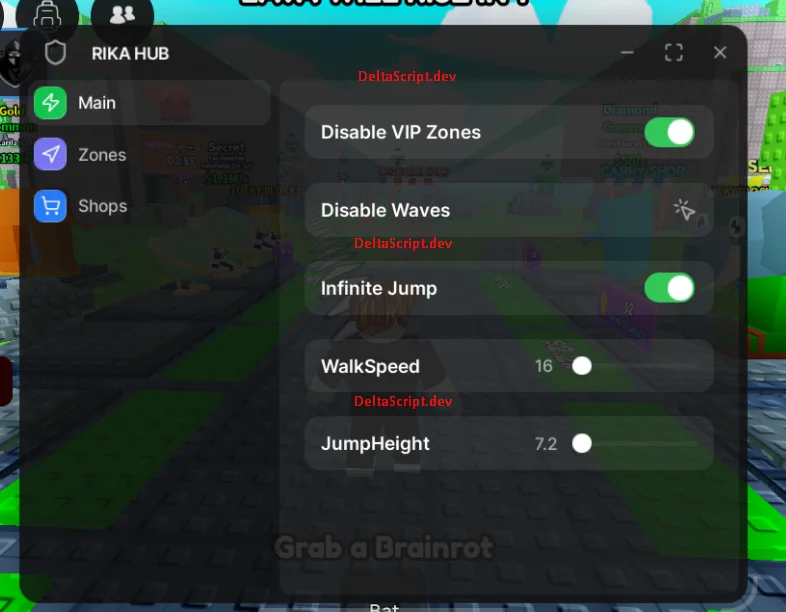
What Is Survive LAVA for Brainrots Script?
The Survive LAVA for Brainrots Script is another Lua-scripted cheat for Roblox that provides access to different tricks in the game. The script allows the user to auto-farm, harvest, steal, teleport, and even delete lava from the game.
The script aims to make your experience smoother, faster, and more fun.
Main Features
- Remove or disable lava
- Teleport to any area
- Max walk speed & jump power
- Auto collect money
- Auto collect brainrots
- Auto farm & fast leveling
RIKA Hub — Script Survive LAVA for Brainrots (NO KEY)
INF Jump, High Jump, Speed Boost, No Lava, Steal All Brainrots, TP All Zones
loadstring(game:HttpGet("https://raw.githubusercontent.com/ianoci/RIKA-HUB/refs/heads/main/Source"))()NGA VG Script Survive LAVA for Brainrots Hack (Keyless)
Remove Lava, Remove VIP Walls, Instant Grab, TP Celestial
loadstring(game:HttpGet("https://raw.githubusercontent.com/ianoci/RIKA-HUB/refs/heads/main/Source"))()INF Jump Script (NO KEY) Script Survive LAVA for Brainrots
Infinite Jump, Toggle Button, GUI Control, Instant Jump, Client Side
local Players = game:GetService("Players")
local UserInputService = game:GetService("UserInputService")

local player = Players.LocalPlayer
local infJump = false

local gui = Instance.new("ScreenGui")
gui.Name = "InfJumpUI"
gui.ResetOnSpawn = false
gui.Parent = player:WaitForChild("PlayerGui")

local frame = Instance.new("Frame")
frame.Size = UDim2.new(0, 160, 0, 70)
frame.Position = UDim2.new(0.05, 0, 0.4, 0)
frame.BackgroundColor3 = Color3.fromRGB(25, 25, 25)
frame.BorderSizePixel = 0
frame.Parent = gui

local corner = Instance.new("UICorner", frame)
corner.CornerRadius = UDim.new(0, 10)

local button = Instance.new("TextButton")
button.Size = UDim2.new(1, -20, 1, -20)
button.Position = UDim2.new(0, 10, 0, 10)
button.Text = "Inf Jump: OFF"
button.TextColor3 = Color3.new(1, 1, 1)
button.BackgroundColor3 = Color3.fromRGB(45, 45, 45)
button.Font = Enum.Font.GothamBold
button.TextSize = 14
button.Parent = frame

local btnCorner = Instance.new("UICorner", button)
btnCorner.CornerRadius = UDim.new(0, 8)

button.MouseButton1Click:Connect(function()
	infJump = not infJump
	button.Text = infJump and "Inf Jump: ON" or "Inf Jump: OFF"
	button.BackgroundColor3 = infJump and Color3.fromRGB(0, 170, 255) or Color3.fromRGB(45, 45, 45)
end)

UserInputService.JumpRequest:Connect(function()
	if infJump then
		local char = player.Character
		if char and char:FindFirstChild("Humanoid") then
			char.Humanoid:ChangeState(Enum.HumanoidStateType.Jumping)
		end
	end
end)
How to Use the Survive LAVA for Brainrots Script
- Install a trusted Roblox executor (compatible with PC or Mobile).
- Open Roblox and join Survive LAVA for Brainrots.
- Launch your executor and attach it to Roblox.
- Paste the Knockout script into the executor.
- Click Execute and wait for the GUI to load.
- Enable features like Auto Win, Auto Farm, and Auto Knockout.
Best Executors for Survive LAVA for Brainrots Roblox Script
Survive LAVA for Brainrots Script works smoothly with: