
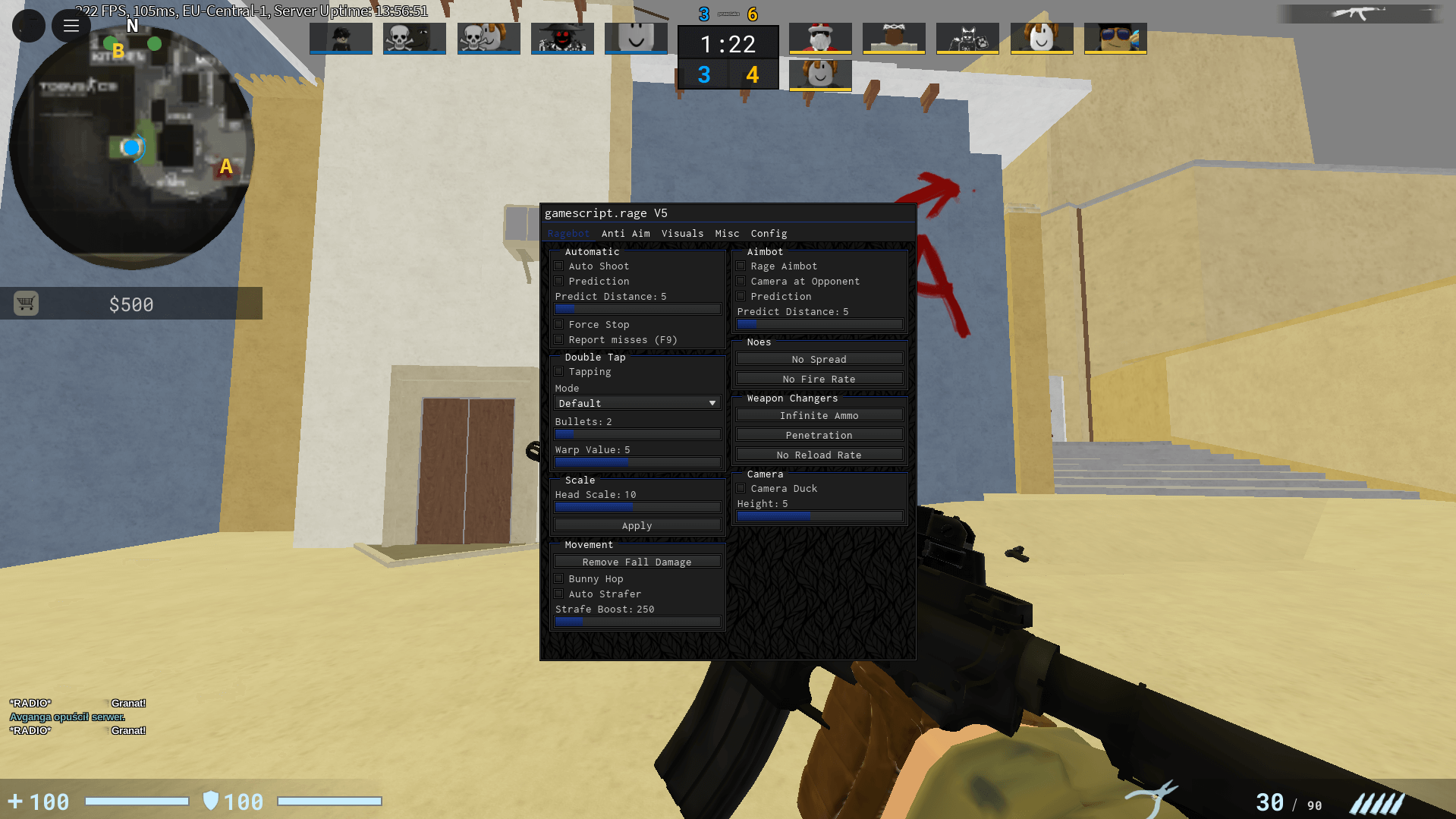
Counter Blox scripts are custom scripts written in the Lua language and are used in the Roblox game Counter Blox. They are used to improve gameplay with functionalities such as aimbot, ESP, gun modifications, and movement assists. This script contains an easy-to-use aim assist cheat and some extra features for improving gameplay. It has a simple GUI that can be toggled by pressing the J key, and it will only show up once you are fully loaded into a game.
The features of this script can be turned on or off by opening the chat in the game and using the cursor to navigate through the menu.

Key Features of Counter Blox Scripts
Most trending Counter Blox scripts offer the following features:
- Aimbot / Legitbot – Improves aim accuracy with adjustable FOV and smoothness
- ESP (Wallhack) – Shows enemy location, health, distance, and weapons
- Gun Mods – No recoil, no spread, instant reload
- BHop (Bunny Hop) – Automatic jumping for faster movement
- Anti-Vote Kick – Helps avoid vote kicks in public servers
- Custom GUI – Easy-to-use script interface with toggles
- Closet Cheating Options – Subtle features for legit gameplay (seen in GitHub scripts like Alora)
📜 Counter Blox Script Code
-- Script taken from https://xenoscripts.com website --

loadstring([[
local P=game:GetService("Players")
local R=game:GetService("RunService")
local U=game:GetService("UserInputService")
local LP=P.LocalPlayer
local C=workspace.CurrentCamera
local settings={autoAim=false,noclip=false,fly=false,speed=105,wallHack=false}
local pg=LP:WaitForChild("PlayerGui")
local sg=Instance.new("ScreenGui",pg)
sg.Name="CustomMenu"
local f=Instance.new("Frame")
f.Size=UDim2.new(0,400,0,310)
f.Position=UDim2.new(0.5,-200,0.5,-155)
f.BackgroundColor3=Color3.new(0,0,0)
f.BorderColor3=Color3.new(1,1,1)
f.BorderSizePixel=2
f.Parent=sg

local function createToggle(t,y,i)
    local c=Instance.new("Frame")
    c.Size=UDim2.new(1,-20,0,50)
    c.Position=UDim2.new(0,10,0,y)
    c.BackgroundTransparency=1
    c.Parent=f
    local l=Instance.new("TextLabel")
    l.Text=t
    l.Font=Enum.Font.SourceSans
    l.TextSize=18
    l.TextColor3=Color3.new(1,1,1)
    l.BackgroundTransparency=1
    l.Size=UDim2.new(0.5,0,1,0)
    l.TextXAlignment=Enum.TextXAlignment.Left
    l.Parent=c
    local tg=Instance.new("Frame")
    tg.Size=UDim2.new(0,70,0,40)
    tg.Position=UDim2.new(0.7,0,0.1,0)
    tg.BackgroundColor3=Color3.new(1,1,1)
    tg.BorderColor3=Color3.new(1,1,1)
    tg.Parent=c
    local tc=Instance.new("Frame")
    tc.Size=UDim2.new(0,34,0,34)
    tc.Position=i and UDim2.new(1,-34,0,3) or UDim2.new(0,0,0,3)
    tc.BackgroundColor3=i and Color3.fromRGB(44,169,72) or Color3.fromRGB(180,180,180)
    tc.BorderColor3=Color3.new(1,1,1)
    tc.Parent=tg
    local tog=i
    local function updateVisual()
        tc.Position=tog and UDim2.new(1,-34,0,3) or UDim2.new(0,0,0,3)
        tc.AnchorPoint=Vector2.new(tog and 1 or 0,0)
        tc.BackgroundColor3=tog and Color3.fromRGB(44,169,72) or Color3.fromRGB(180,180,180)
    end
    tg.InputBegan:Connect(function(input)
        if input.UserInputType==Enum.UserInputType.MouseButton1 then
            tog=not tog
            updateVisual()
            f:SetAttribute(t,tog)
        end
    end)
    updateVisual()
    return {get=function()return tog end,set=function(v) tog=v updateVisual() end}
end

local function createSlider(t,y,min,max,i)
    local c=Instance.new("Frame")
    c.Size=UDim2.new(1,-20,0,60)
    c.Position=UDim2.new(0,10,0,y)
    c.BackgroundTransparency=1
    c.Parent=f
    local l=Instance.new("TextLabel")
    l.Text=t
    l.Font=Enum.Font.SourceSans
    l.TextSize=18
    l.TextColor3=Color3.new(1,1,1)
    l.BackgroundTransparency=1
    l.Size=UDim2.new(0.3,0,0.4,0)
    l.TextXAlignment=Enum.TextXAlignment.Left
    l.Parent=c
    local vl=Instance.new("TextLabel")
    vl.Text=tostring(i)
    vl.Font=Enum.Font.SourceSans
    vl.TextSize=18
    vl.TextColor3=Color3.new(1,1,1)
    vl.BackgroundTransparency=1
    vl.Size=UDim2.new(0.1,0,0.4,0)
    vl.Position=UDim2.new(0.85,0,0,0)
    vl.Parent=c
    local sb=Instance.new("Frame")
    sb.Size=UDim2.new(0.9,0,0.3,0)
    sb.Position=UDim2.new(0,0,0.5,0)
    sb.BackgroundColor3=Color3.new(1,1,1)
    sb.BorderColor3=Color3.new(1,1,1)
    sb.Parent=c
    local sk=Instance.new("Frame")
    sk.Size=UDim2.new(0,24,1,0)
    sk.Position=UDim2.new((i-min)/(max-min),-12,0,0)
    sk.BackgroundColor3=Color3.fromRGB(255,0,0)
    sk.BorderColor3=Color3.new(1,1,1)
    sk.Parent=sb
    sk.Active=true
    sk.Draggable=true
    local d=false
    sk.InputBegan:Connect(function(input)
        if input.UserInputType==Enum.UserInputType.MouseButton1 then
            d=true
        end
    end)
    sk.InputEnded:Connect(function(input)
        if input.UserInputType==Enum.UserInputType.MouseButton1 then
            d=false
        end
    end)
    U.InputChanged:Connect(function(input)
        if d and input.UserInputType==Enum.UserInputType.MouseMovement then
            local rx=math.clamp(input.Position.X-sb.AbsolutePosition.X,0,sb.AbsoluteSize.X)
            local p=rx/sb.AbsoluteSize.X
            sk.Position=UDim2.new(p,-12,0,0)
            local v=math.floor(min+(max-min)*p+0.5)
            vl.Text=tostring(v)
            f:SetAttribute(t,v)
        end
    end)
    return {get=function()return tonumber(vl.Text)end,set=function(v)
        v=math.clamp(v,min,max)
        local p=(v-min)/(max-min)
        sk.Position=UDim2.new(p,-12,0,0)
        vl.Text=tostring(v)
    end}
end

local autoAimToggle=createToggle("auto aim (hold RMB)",10,false)
local noclipToggle=createToggle("noclip",70,false)
local flyToggle=createToggle("fly",130,false)
local speedSlider=createSlider("speed",190,0,200,105)
local wallHackToggle=createToggle("wall hack",260,false)

U.InputBegan:Connect(function(input,gp)
    if gp then return end
    if input.KeyCode==Enum.KeyCode.J then
        f.Visible=not f.Visible
    end
end)

local AIM_PART="Head"

local function getClosestEnemy()
    local c=nil
    local sd=150
    local mpos=U:GetMouseLocation()
    for _,pl in ipairs(P:GetPlayers())do
        if pl~=LP and pl.Team~=LP.Team and pl.Character and pl.Character:FindFirstChild(AIM_PART)then
            local part=pl.Character[AIM_PART]
            local sp,onScreen=C:WorldToViewportPoint(part.Position)
            if onScreen then
                local dist=(Vector2.new(sp.X,sp.Y)-Vector2.new(mpos.X,mpos.Y)).Magnitude
                if dist<sd then
                    sd=dist
                    c=part
                end
            end
        end
    end
    return c
end

R.RenderStepped:Connect(function()
    if autoAimToggle.get()and U:IsMouseButtonPressed(Enum.UserInputType.MouseButton2)then
        local target=getClosestEnemy()
        if target then
            C.CFrame=CFrame.new(C.CFrame.Position,target.Position)
        end
    end
end)

R.Stepped:Connect(function()
    if noclipToggle.get()and LP.Character then
        for _,p in ipairs(LP.Character:GetDescendants())do
            if p:IsA("BasePart")then
                p.CanCollide=false
            end
        end
    end
end)

local flyingKeys={[Enum.KeyCode.W]=Vector3.new(0,0,1),[Enum.KeyCode.S]=Vector3.new(0,0,-1),[Enum.KeyCode.A]=Vector3.new(-1,0,0),[Enum.KeyCode.D]=Vector3.new(1,0,0),[Enum.KeyCode.Space]=Vector3.new(0,1,0),[Enum.KeyCode.LeftControl]=Vector3.new(0,-1,0)}
local flyingDirectionsPressed={}
U.InputBegan:Connect(function(input)
    if flyToggle.get()and flyingKeys[input.KeyCode]then
        flyingDirectionsPressed[input.KeyCode]=true
    end
end)
U.InputEnded:Connect(function(input)
    if flyToggle.get()and flyingKeys[input.KeyCode]then
        flyingDirectionsPressed[input.KeyCode]=nil
    end
end)
R.RenderStepped:Connect(function()
    if flyToggle.get()and LP.Character and LP.Character:FindFirstChild("HumanoidRootPart")then
        local root=LP.Character.HumanoidRootPart
        local velocity=Vector3.new(0,0,0)
        for k,v in pairs(flyingDirectionsPressed)do
            velocity=velocity+flyingKeys[k]
        end
        root.Velocity=velocity*speedSlider.get()
    end
end)
]])()
Compatible Executors
How to Use Counter Blox Script in Roblox?
Counter Blox Script use Roblox executors like Delta or Krnl Executor to hook into the game’s functions. Once injected, the script reads the current letter prompt, accesses a built-in word library, and submits valid words instantly, maximizing speed and accuracy.
Steps:
- Download Delta Executor or KRNl.
- Open Roblox and join game.
- Launch Executor.
- Copy the ink game script from the list above and past it to execute.
- Press Execute, features like Auto Win, Glass ESP, and Godmode will activate instantly.
Works on PC, Android, and iOS.
FAQs – Counter Blox Scripts
Q1: Are Counter Blox scripts free?
Yes, most scripts found on GitHub, ScriptBlox, and Rscripts are free.
Q2: Can Counter Blox scripts get my account banned?
Yes. Using scripts violates Roblox’s Terms of Service and can result in temporary or permanent bans.
Q3: Which features are most popular?
Aimbot, ESP, gun mods, and legitbot features are the most searched and used.
Q4: Do scripts still work in 2025?
Some do, but many older scripts are patched. Updated scripts from active developers work better.
Q5: Are YouTube Counter Blox scripts safe?
Not always. Many videos are outdated or use fake Pastebin links. Always verify the source.